Lazyflow
A free, open-source iOS app for AI-powered task management with Focus Mode, Quick Capture, two-way Apple Calendar sync, and smart "Next Up" recommendations.

Overview
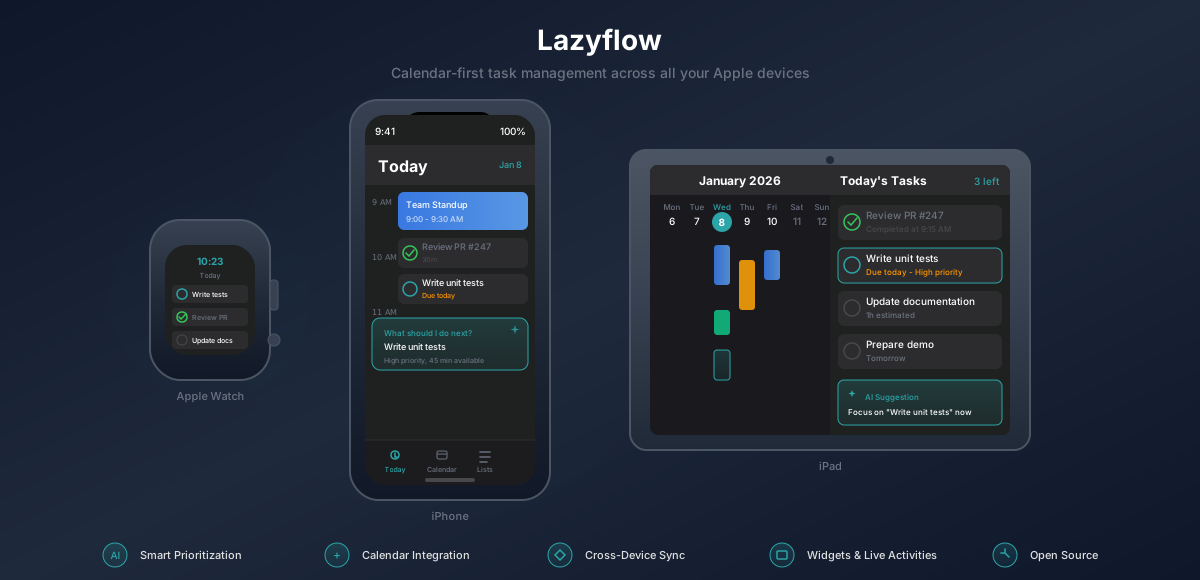
Lazyflow is a calendar-first todo app that seamlessly integrates with Apple Calendar. Unlike traditional task managers that treat tasks and calendar events separately, Lazyflow helps users plan their day by viewing everything in one place and getting AI-powered recommendations for what to work on next.
The app is completely free, open-source, and privacy-focused -- all data stays on the user's device with optional iCloud sync.
Problem Statement
Most todo apps fail at helping users actually plan their day:
- Fragmented Experience - Tasks live separately from calendar, forcing users to context-switch
- No Prioritization Help - Users must manually decide what to work on next
- No Focus Support - No built-in tools for deep work or distraction management
- No Time Awareness - Tasks don't account for available time between meetings
- Privacy Concerns - Most productivity apps track user data and require subscriptions
Technical Approach
Built a native iOS app with a focus on seamless Apple ecosystem integration:
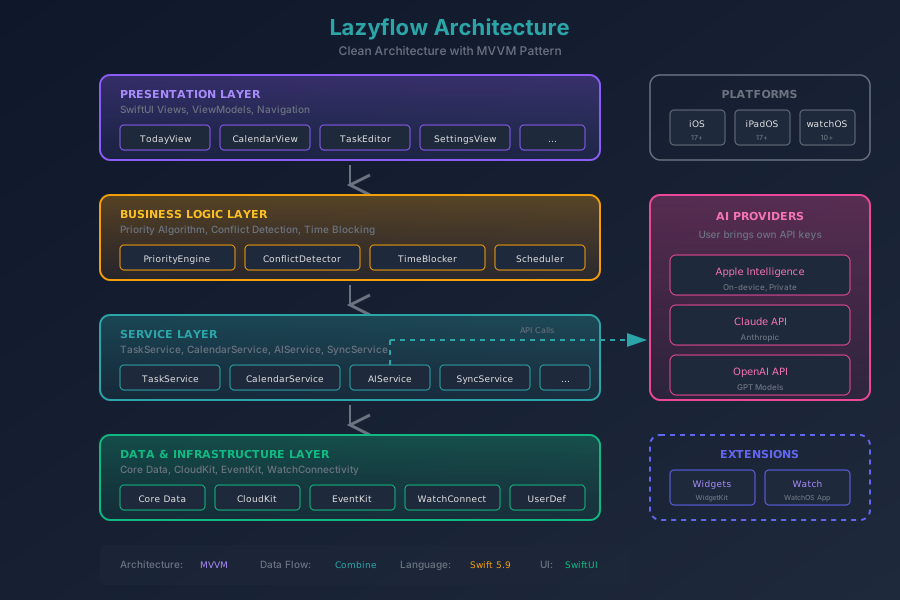
Architecture
Core Technologies:
- SwiftUI - Modern declarative UI with MVVM + @Observable architecture
- Core Data + CloudKit - Offline-first with seamless iCloud sync
- EventKit - Two-way Apple Calendar sync with recurring event support
- App Intents - Siri Shortcuts and system integration
- WidgetKit - Home Screen widgets (small, medium, large)
- ActivityKit - Live Activities and Dynamic Island support
- WatchConnectivity - Real-time sync with Apple Watch
- String Catalogs - Localization-ready with .xcstrings
AI Integration:
- Apple Intelligence (on-device, private)
- Claude API (Anthropic)
- OpenAI API
- User brings their own API keys -- no data leaves device without consent
Key Features
- Quick Capture - Tap the floating pencil button, jot a note, and let AI extract structured tasks automatically. Drag the button to reposition it along the screen edge.
- Focus Mode - Pomodoro timer with configurable work/break intervals, subtasks panel, and session persistence across app restarts. Enter from the Next Up card or any task.
- Calendar Sync - Two-way sync between tasks and Apple Calendar events, with scheduled start/end times and recurring event support
- Next Up AI - Smart "What should I do next?" recommendations with Start, Focus, and Later actions
- Morning Briefing - AI-generated daily overview with yesterday's recap, today's plan, and weekly productivity stats
- Insights Dashboard - Centralized hub for AI insights, task history, analytics, and AI quality metrics
- Subtasks - Break down complex tasks into subtasks with automatic parent completion
- Time Tracking - Monitor task duration with automatic start/stop timestamps
- Daily Summary - Completion streaks and AI-generated productivity insights
- Multi-Platform - iPhone, iPad, Apple Watch with real-time sync
- Widgets - Home Screen widgets in 3 sizes for quick task access
- Live Activities - Track current task in Dynamic Island
- Siri Shortcuts - Voice commands for hands-free task management
- Accessibility - VoiceOver labels and hints on all screens, full Dynamic Type support
- Privacy First - All data on-device, no tracking, no analytics
Challenges & Solutions
1. Calendar + Tasks Unified View
- Challenge: EventKit and Core Data have different data models and update patterns
- Solution: Built unified data layer that merges both sources with real-time Combine publishers
2. Two-Way Calendar Sync
- Challenge: Keeping tasks and calendar events in sync bidirectionally without creating duplicates or losing data on conflicts
- Solution: Implemented change tracking with persistent history tokens, conflict resolution strategy, and support for recurring event patterns
3. AI Without Privacy Compromise
- Challenge: Users want AI features but are concerned about data privacy
- Solution: Support multiple providers including on-device Apple Intelligence; user provides their own API keys
4. Focus Mode Session Persistence
- Challenge: Pomodoro sessions need to survive app backgrounding, termination, and device restarts
- Solution: Persist timer state to disk on every transition, restore elapsed time on launch using wall-clock timestamps
5. Cross-Device Sync
- Challenge: Tasks need to sync seamlessly across iPhone, iPad, and Apple Watch
- Solution: CloudKit with NSPersistentCloudKitContainer for automatic sync, WatchConnectivity for immediate Watch updates
Technologies
Languages: Swift 6.0
Frameworks: SwiftUI, Core Data, CloudKit, EventKit, WidgetKit, ActivityKit, WatchConnectivity, App Intents, MetricKit
Architecture: MVVM with @Observable for reactive data flow, SPM packages (LazyflowCore, LazyflowUI)
AI: Apple Intelligence, Claude API, OpenAI API
Platforms: iOS 17+, iPadOS 17+, watchOS 10+
Impact
User-Focused:
- 100% free with no ads or subscriptions
- Privacy-first design with on-device data storage
- Full accessibility support with VoiceOver and Dynamic Type
- Open source under MIT license for transparency and community contributions
Technical Achievement:
- Full Apple ecosystem integration (iPhone, iPad, Watch, Widgets, Siri, Live Activities)
- Multi-provider AI support with privacy-preserving architecture
- Modular codebase with SPM packages for shared models and design system
- Production app on App Store with automated CI/CD via Fastlane and Release Please
Open Source:
- Complete codebase available on GitHub
- Demonstrates modern SwiftUI patterns and best practices
- Snapshot tests, feature flags, and comprehensive test coverage
Links
Screenshots
Today view with Next Up AI suggestion, Start/Focus/Later actions, and draggable Quick Capture button
Active task with time tracking, pause control, and one-tap Focus Mode entry
Focus Mode with Pomodoro timer, session tracking, and distraction-free interface
AI-generated Morning Briefing with yesterday's recap, today's plan, and weekly stats
Insights hub with Morning Briefing, Daily Summary, AI Quality metrics, History, and Analytics
Task editor with date, priority, category, list, reminders, duration, recurrence, and subtasks
Quick task creation with smart defaults and AI-powered note extraction
Apple Watch app for quick task management on the go