diskard
An open-source Rust CLI/TUI tool for developer-aware disk cleanup that scans for reclaimable space from build caches, AI models, package managers, and IDE artifacts.
Overview
diskard is a developer-aware disk cleanup tool built in Rust. It understands the structure of developer workspaces — build caches, AI model caches, package manager artifacts, IDE files — and helps reclaim disk space safely. Unlike generic disk analyzers, diskard knows what's safe to delete and what isn't, using risk-level categorization and trash-based deletion by default.
The tool provides both a CLI for scripting and an interactive TUI built with ratatui for hands-on exploration and cleanup.
Problem Statement
Developers accumulate massive amounts of reclaimable disk space over time:
- Build caches — Xcode DerivedData, Rust target/, node_modules, Gradle caches
- AI model caches — Ollama models, HuggingFace hub, Claude cache
- Package manager caches — Homebrew, pip, CocoaPods
- IDE artifacts — VS Code caches, JetBrains indexes
Existing tools like du or ncdu show raw disk usage but don't understand what's safe to remove. Tools like kondo focus only on build artifacts. diskard combines smart recognition across 18 categories with an interactive TUI for safe, informed cleanup.
Technical Approach
Architecture
The project uses a Rust workspace with three crates:
diskard(binary) — CLI entry point with clap-based argument parsing and command routingdiskard-core(library) — Recognizers, parallel scanner, cleaner, config system, and data typesdiskard-tui(optional feature) — Interactive terminal UI built with ratatui and crossterm
Recognizer System
Each recognizer implements a Recognizer trait (Send + Sync) with methods for name(), id(), category(), and scan(). The 18 recognizers cover:
- Build Systems: Xcode DerivedData, Xcode Archives, Rust target/, Node modules, Gradle/Maven, CocoaPods
- Package Managers: Homebrew cache, pip cache
- AI/ML: Ollama models, HuggingFace hub, Claude cache
- IDE: VS Code caches
- System: Generic caches, Docker, logs, trash
Parallel Scanning
The scanner uses rayon for parallel execution across all recognizers and jwalk for fast filesystem traversal. Each finding includes path, category, risk level (Safe/Moderate/Risky), size, description, and last modified date.
Interactive TUI
The TUI features:
- Disk usage header with a LineGauge visualization, color-coded by usage thresholds (green <70%, yellow 70-85%, red >85%)
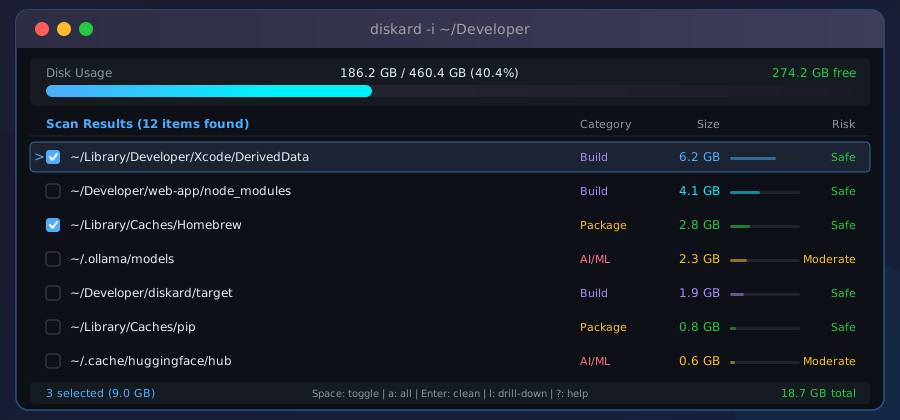
- Scan results list with inline size bars using block characters, checkboxes for selection, and category labels
- Drill-down inspector for exploring directory contents with breadcrumb navigation
- Select-all and confirmation dialog before any deletion
- Help overlay with keyboard shortcut reference
Deletion defaults to moving files to Trash via the trash crate, with optional permanent deletion.
Key Features
- 18 Recognizers covering build caches, AI models, package managers, IDEs, and system artifacts
- Interactive TUI with drill-down directory inspection and disk visualization
- Parallel Scanning using rayon for fast multi-core traversal
- Safe Deletion via Trash by default (not permanent delete)
- CLI Filters — filter by
--category,--sort,--older-than - Shell Completions for Bash, Zsh, Fish, and PowerShell
- Config System via TOML at
~/.config/diskard/config.toml - Cross-Platform — CI tested on macOS and Ubuntu
Challenges & Solutions
1. Recognizing Developer-Specific Artifacts
- Challenge: Generic disk tools don't distinguish between important project files and reclaimable caches
- Solution: Built 18 specialized recognizers that understand the structure of each tool's cache directory, with risk-level classification
2. Safe Deletion by Default
- Challenge: Users are hesitant to delete files they're unsure about
- Solution: Uses the
trashcrate to move files to system Trash instead of permanent deletion; TUI shows risk levels and allows drill-down inspection before confirming
3. Performance at Scale
- Challenge: Scanning entire home directories with many nested projects is slow
- Solution: Parallel scanning with rayon across recognizers and jwalk for filesystem traversal
Technologies
Language: Rust
Key Dependencies: clap (CLI), ratatui + crossterm (TUI), rayon + jwalk (parallelism), trash (safe deletion), serde + toml (config), bytesize (formatting), fs2 (disk stats), chrono (timestamps)
CI/CD: GitHub Actions (fmt, clippy, test on macOS + Ubuntu), Release Please for automated versioning
Distribution: crates.io (cargo install diskard), Homebrew (brew install connectwithprakash/tap/diskard)
Impact
- Published on crates.io as three crates (diskard, diskard-core, diskard-tui)
- Installable via Homebrew tap with auto-update GitHub Action
- Open source under MIT + Apache 2.0 dual license
- Automated release pipeline with Release Please and cross-platform CI
Links
- crates.io: https://crates.io/crates/diskard
- GitHub: https://github.com/connectwithprakash/diskard
- Homebrew:
brew install connectwithprakash/tap/diskard
Screenshots
Interactive TUI showing scan results with 26 reclaimable items sorted by size
Item selection with checkboxes for targeted cleanup
Drill-down view inspecting Xcode DerivedData directory contents
Related Links
Installation
# Install via Homebrew
brew install connectwithprakash/tap/diskard

# Or install via cargo
cargo install diskard

# Run interactive TUI
diskard -i

# Run CLI scan
diskard scan ~/Developer